Problem
Users reporting that emails beyond a certain year (in this case 2013) cannot be retrieved from archive. Double clicking on the email causes the Add-on to search but in the end the following message is returned
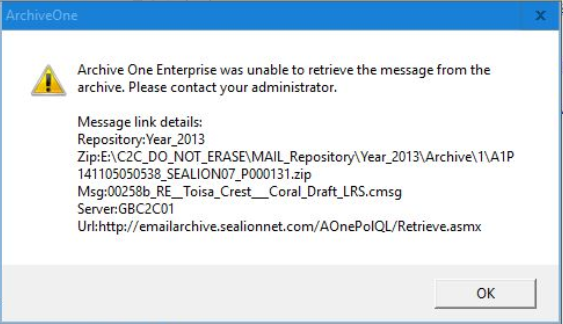
There were two issues here. First the actual Year_2013 repository in the Mailbox Repositories of the ArchiveOnePolicy admin portal was missing (a known problem with v7.1.0.3332) though the actual files and folders for Year_2013 were present on the repository drive storage. And secondly the link being reflected above points to an historic archive from before the C2C system was migrated.
The missing Mailbox Repository was reported in the ArchiveOne Enterprise Deployment Analyzer emails as an “error” in the 0600 email and can be seen as such under the System Health listings in the portal.
Resolution
Login to the C2C server (note that C2C was taken over by Barracuda so will be a rebranded soon) using the special admin user ArchiveOneAdmin and open the ArchiveOne Enterprise portal
In Mailbox Repository – open the properties of one of the years (say Year_2016) and take a note of (a) Settings tab – Archive Base Directory location for that year, (b) Index tab and Index Base Directory for that year and (c) Temporary Data tab and check the location for Temporary Data (should be the same as the Index location). Close Properties.
Now right click on Mailbox Repositories and start New Mailbox Repository, Next, give the Repository Name the same name as the missing repository (for example Year_2013) Next, Next, Browse to the directory where the Index files are stored (in a similar form to the directory for Index you noted from above). Next and repeat for all the prompts of the wizard using the equivalent locations for that year as you noted above)
Once the wizard completes the mailbox is automatically synchronised and the index rebuilt. Else use Restore Index.