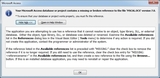
On opening a database that references Microsoft’s ActiveX Calendar Control file (mscal.ocx) in Microsoft Access 2010, the following error message is displayed:
“Your Microsoft Access database or project contains a missing or broken reference to the file ‘MSCAL.OCX’ version 7.0”
Clicking on the ‘OK’ button allows the database to open, however subsequent navigation to other forms also invokes the same error message.
| 1. | Resolution
To temporarily resolve this problem follow the steps outlined below. |
 |
| 2. | Get the missing MSCAL.OCX file
Locate the missing MSCAL.OCX file from an Office 2007 installation. (Within our network the file can be found at Z:\Tools\Office2010x64) |
|
| 3. | Copy
Copy the file to the %SystemRoot%\SysWow64 directory of the computer where the Access 2010 installation exist. |
|
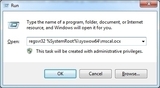
| 4. | Register the calendar control tool (.OCX file)
I. Click on the Windows Start menu and select ‘Run’ |
 |
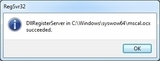
| 5. | Accept the registration confirmation message
Select OK to accept the displayed message confirming that the file was registered successfully. |
 |
| 6. | Test
Restart Access 2010 so that the Calendar Control file reference can be recognised. |
Note from msdn.microsoft.com:
Microsoft Access has included a Calendar control since it first added support for ActiveX controls, in Access 2.0. The calendar control, MSCAL.OCX, is not included with Access 2010. In addition, if you attempt to open a form that includes the control, you will receive the following error: “Your Microsoft Office Access database or project contains a missing or broken reference to the file ꞌMSCAL.OCXꞌ.”