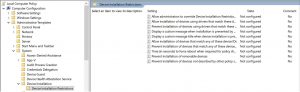
Sometimes when a Dell USB-Ethernet adapter is added to a laptop it won’t work. This is due to a couple of setting in the Group Policy.
Firstly open your Group Policy Editor, (gpedit.msc).
Then go to:
Computer Configuration
Administrative Templates
System
Device Installation
Device Installation Restrictions
Set to ‘Not Configured’
‘Prevent installation of devices using drivers that match these device setup classes’ and ‘Prevent installation of devices that match any of these device IDs’